
Overview
Fulfil provides a comprehensive returns management system that handles the complete lifecycle from return initiation to final disposition. Returns can originate from multiple sources including Shopify, Amazon, or be created manually within Fulfil. Once a return is created, Fulfil generates a Customer Return Shipment (CRS) and routes it to the appropriate warehouse, making the return available via the 3PL API for warehouse operations.
Return Sources
Returns in Fulfil can be initiated from:
- Shopify: Via Shopify's native returns API or return platforms (Loop, Redo, etc.)
- Amazon: Via Amazon's returns system
- Manual Creation: Directly in Fulfil by customer service or operations teams
- Other Channels: Any sales channel integrated with Fulfil
Regardless of the source, all returns follow the same workflow within Fulfil once created.
Return Lifecycle
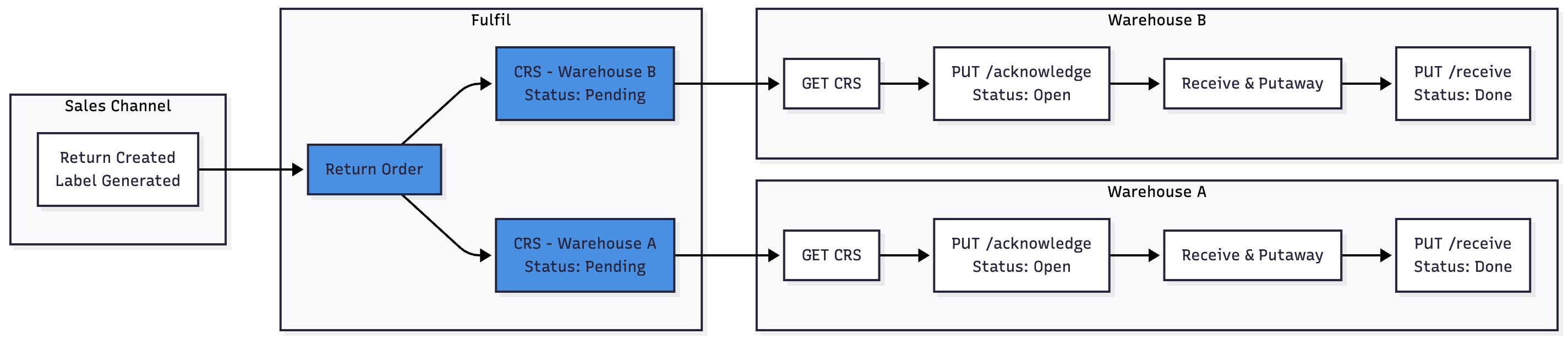
Detailed Workflow
Step 1: Return Creation
Returns can be created from any sales channel (Shopify, Amazon, etc.) or manually within Fulfil. Once a return is initiated:
- Customer generates return label on the sales channel
- Fulfil creates a return order
- Return order is linked to the original sales order
Step 2: Warehouse Assignment & CRS Creation
Warehouse Assignment:
Fulfil determines which warehouse(s) should receive the return items. This can be based on:
- Where the items were originally shipped from
- Merchant-configured routing rules
- Product-specific warehouse assignments
Multi-Warehouse Scenarios:
When a return contains items from different warehouses, Fulfil creates multiple Customer Return Shipments (CRS) - one for each warehouse.
Example:
- Customer returns 3 items
- Item A was shipped from Warehouse 1
- Items B & C were shipped from Warehouse 2
- Fulfil creates:
- CRS-001 for Warehouse 1 (Item A)
- CRS-002 for Warehouse 2 (Items B & C)
CRS Record Contents:
Each CRS contains:
- Return Details: CRS number, planned date
- Status: Pending (awaiting 3PL acknowledgment)
- Customer Information: Name, contact details, customer code
- Addresses:
- Origin address (customer's location - where return ships FROM)
- Delivery address (warehouse return address - where return ships TO)
- Line Items: Products being returned with quantities, UOM, original order references
- Shipping Information: Carrier, service level, tracking (when available)
- Related Orders: Original sales orders for reference
- Channels: Sales channels involved
Step 3: 3PL Integration - Fetching CRS
Polling for New Returns
3PLs use the GET endpoint to retrieve customer return shipments:
GET /v1/customer-return-shipments.json?status=pending&page=1
Status Values:
pending: New CRS not yet acknowledged by 3PL (default)open: CRS acknowledged but not yet received/completeddone: Completed CRS
Recommended Polling Strategy:
- Poll every 15-30 minutes for
status=pending - Use
updated_at_minparameter for incremental sync - Process in batches of up to 250 records
Additional Filters:
- By planned date range:
planned_date_min,planned_date_max - By update timestamp:
updated_at_min,updated_at_max - By warehouse (if 3PL manages multiple warehouses)
- By specific CRS numbers or IDs
Response Processing:
- Extract CRS ID and number
- Store customer and address information
- Parse line items for receiving
- Note tracking information if present
- Import into your WMS
Step 4: Acknowledge CRS (Optional but Recommended)
Once the CRS has been imported into your WMS:
PUT /v1/customer-return-shipments/acknowledge.json
Purpose:
- Provides visibility to merchant that you've received the CRS
- Updates CRS status from Pending to Open
- Helps track processing timeline
When to Call:
- After successfully importing CRS into your WMS
- Before physical package arrives
- As soon as CRS data is validated and stored
Step 5: Physical Operations
Package Arrives at Warehouse:
- Customer ships package using label from sales channel
- Warehouse receives package
- Scan tracking number or CRS number
- Verify items against CRS line items
- Perform quality inspection:
- Good: Items are moved back to sellable inventory
- Damaged: Items thrown away to lost and found
Step 6: Mark CRS as Received
After items are received and put away:
PUT /v1/customer-return-shipments/receive.json
Purpose:
- Marks CRS as complete in Fulfil
- Updates CRS status to Done
- Closes return on sales channel
- Triggers inventory sync for items in primary storage locations
When to Call:
- After all items have been physically received
- After items have been put away to appropriate locations
- After quality inspection is complete
What Happens:
- CRS marked as Done in Fulfil
- Return closed on sales channel
- Inventory updates processed based on putaway locations
- Only items in Primary Storage sync to channel as available for sale